Advanced Tutorial
In this tutorial, we will look at how to run PyReason with a more complex graph.
Note
Find the full, executable code here
Graph
We use a larger graph for this example. In this example , we have customers , cars , pets and their relationships.
We first have customer_details followed by car_details , pet_details , travel_details .
customer_details = [
    ('John', 'M', 'New York', 'NY'),
    ('Mary', 'F', 'Los Angeles', 'CA'),
    ('Justin', 'M', 'Chicago', 'IL'),
    ('Alice', 'F', 'Houston', 'TX'),
    ('Bob', 'M', 'Phoenix', 'AZ'),
    ('Eva', 'F', 'San Diego', 'CA'),
    ('Mike', 'M', 'Dallas', 'TX')
]
pet_details = [
    ('Dog', 'Mammal'),
    ('Cat', 'Mammal'),
    ('Rabbit', 'Mammal'),
    ('Parrot', 'Bird'),
    ('Fish', 'Fish')
]
car_details = [
    ('Toyota Camry', 'Red'),
    ('Honda Civic', 'Blue'),
    ('Ford Focus', 'Red'),
    ('BMW 3 Series', 'Black'),
    ('Tesla Model S', 'Red'),
    ('Chevrolet Bolt EV', 'White'),
    ('Ford Mustang', 'Yellow'),
    ('Audi A4', 'Silver'),
    ('Mercedes-Benz C-Class', 'Grey'),
    ('Subaru Outback', 'Green'),
    ('Volkswagen Golf', 'Blue'),
    ('Porsche 911', 'Black')
]
travels = [
    ('John', 'Los Angeles', 'CA', 'New York', 'NY', 2),
    ('Alice', 'Houston', 'TX', 'Phoenix', 'AZ', 5),
    ('Eva', 'San Diego', 'CA', 'Dallas', 'TX', 1),
    ('Mike', 'Dallas', 'TX', 'Chicago', 'IL', 3)
]
We now have the relationships between the customers , cars , pets and travel details.
friendships = [('customer_2', 'customer_1'), ('customer_0', 'customer_1'), ('customer_3', 'customer_2'),
               ('customer_3', 'customer_4'), ('customer_4', 'customer_0'), ('customer_5', 'customer_3'),
               ('customer_6', 'customer_0'), ('customer_5', 'customer_6'), ('customer_4', 'customer_6'),
               ('customer_3', 'customer_1')]
car_ownerships = [('customer_1', 'Car_0'), ('customer_2', 'Car_1'), ('customer_0', 'Car_2'), ('customer_3', 'Car_3'),
                  ('customer_4', 'Car_4'), ('customer_3', 'Car_0'), ('customer_2', 'Car_3'), ('customer_5', 'Car_5'),
                  ('customer_6', 'Car_6'), ('customer_0', 'Car_7'), ('customer_1', 'Car_8'), ('customer_4', 'Car_9'),
                  ('customer_3', 'Car_10'), ('customer_2', 'Car_11'), ('customer_5', 'Car_2'), ('customer_6', 'Car_4')]

pet_ownerships = [('customer_1', 'Pet_1'), ('customer_2', 'Pet_1'), ('customer_2', 'Pet_0'), ('customer_0', 'Pet_0'),
                  ('customer_3', 'Pet_2'), ('customer_4', 'Pet_2'), ('customer_5', 'Pet_3'), ('customer_6', 'Pet_4'),
                  ('customer_0', 'Pet_4')]
Based on the relationships we now connect the nodes, edges and the form the graph.
for customer_id, details in customer_dict.items():
    attributes = {
        f'c_id-{customer_id}': 1,
        'name': details[0],
        'gender': details[1],
        'city': details[2],
        'state': details[3],
    }
    name = "customer_" + str(customer_id)
    g.add_node(name, **attributes)

for pet_id, details in pet_dict.items():
    dynamic_attribute = f"Pet_{pet_id}"
    attributes = {
        f'pet_id-{pet_id}': 1,
        'species': details[0],
        'class': details[1],
        dynamic_attribute: 1
    }
    name = "Pet_" + str(pet_id)
    g.add_node(name, **attributes)

for car_id, details in car_dict.items():
    dynamic_attribute = f"Car_{car_id}"
    attributes = {
        f'car_id-{car_id}': 1,
        'model': details[0],
        'color': details[1],
        dynamic_attribute: 1
    }
    name = "Car_" + str(car_id)
    g.add_node(name, **attributes)

# Add relationships(edges) between customers, pets, and cars

for f1, f2 in friendships:
    g.add_edge(f1, f2, Friends=1)
for owner, car in car_ownerships:
    g.add_edge(owner, car, owns_car=1, car_color_id=int(car.split('_')[1]))
for owner, pet in pet_ownerships:
    g.add_edge(owner, pet, owns_pet=1)
We now have the graph ready. We can now add the rules for our use case. Take a look at it at
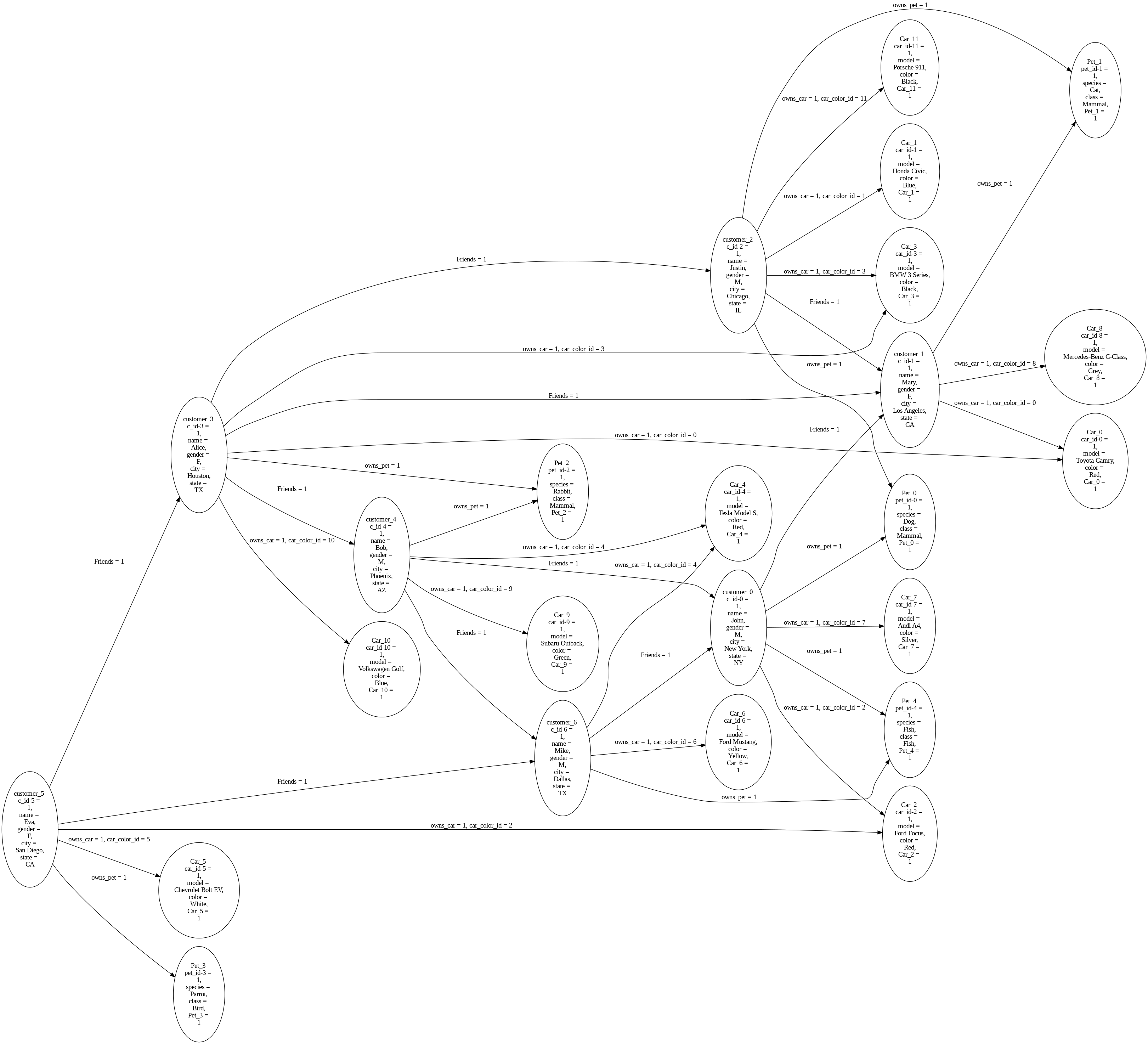
advanced graph image
Rules
The below are the rules we want to add:
A customer is popular if he is friends with a popular customer.
A customer has a cool car if he owns a car and the car is of type
Car_4.A customer has a cool pet if he owns a pet and the pet is of type
Pet_2.A customer is trendy if he has a cool car and a cool pet.
pr.add_rule(pr.Rule('popular(x) <-1 popular(y), Friends(x,y)', 'popular_pet_rule'))
pr.add_rule(pr.Rule('cool_car(x) <-1 owns_car(x,y),Car_4(y)', 'cool_car_rule'))
pr.add_rule(pr.Rule('cool_pet(x)<-1 owns_pet(x,y),Pet_2(y)', 'cool_pet_rule'))
pr.add_rule(pr.Rule('trendy(x) <- cool_car(x) , cool_pet(x)', 'trendy_rule'))
The above rules are based on nodes. Now let us add some more rules based on the edges.
Two customers are
car_friendsif they own the same car.Two customers are
friendsif they own the same color car.
pr.add_rule(pr.Rule("car_friend(x,y) <- owns_car(x,z), owns_car(y,z)", "car_friend_rule"))
pr.add_rule(pr.Rule("same_color_car(x, y) <- owns_car(x, c1) , owns_car(y, c2)","same_car_color_rule"))
Facts
We now add the facts to the graph.
There is only one fact we are going to use.
1. customer_0 is popular from time 0 to 5.
pr.add_fact(pr.Fact(name='popular-fact', fact_text='popular(customer_0)', 0, 5))
Running Pyreason
We now run the PyReason interpretation with the graph and the rules.
interpretation = pr.reason(timesteps=6)
# pr.save_rule_trace(interpretation)

interpretations_dict = interpretation.get_dict()

df1 = pr.filter_and_sort_nodes(interpretation, ['trendy', 'cool_car', 'cool_pet', 'popular'])
df2 = pr.filter_and_sort_edges(interpretation, ['car_friend', 'same_color_car'])
Expected Output
Below is the expected output at timestep 0
Note
Find the full expected output here
shortend output

Interpretations:
{0: {'Car_0': {},
   'Car_1': {},
   'Car_10': {},
   'Car_11': {},
   'Car_2': {},
   'Car_3': {},
   'Car_4': {},
   'Car_5': {},
   'Car_6': {},
   'Car_7': {},
   'Car_8': {},
   'Car_9': {},
   'Pet_0': {},
   'Pet_1': {},
   'Pet_2': {},
   'Pet_3': {},
   'Pet_4': {},
   'customer_0': {},
   'customer_1': {},
   'customer_2': {},
   'customer_3': {},
   'customer_4': {},
   'customer_5': {},
   'customer_6': {},
   'popular-fac': {'popular-fac': (1.0, 1.0)},
   ('customer_0', 'Car_2'): {},
   ('customer_0', 'Car_7'): {},
   ('customer_0', 'Pet_0'): {},
   ('customer_0', 'Pet_4'): {},
   ('customer_0', 'customer_1'): {'same_color_car': (1.0, 1.0)},
   ('customer_0', 'customer_2'): {'same_color_car': (1.0, 1.0)},
   ('customer_1', 'Car_0'): {},
   ('customer_1', 'Car_8'): {},
   ('customer_1', 'Pet_1'): {},
   ('customer_2', 'Car_1'): {},
   ('customer_2', 'Car_11'): {},
   ('customer_2', 'Car_3'): {},
   ('customer_2', 'Pet_0'): {},
   ('customer_2', 'Pet_1'): {},
   ('customer_2', 'customer_1'): {'same_color_car': (1.0, 1.0)},
   ('customer_3', 'Car_0'): {},
   ('customer_3', 'Car_10'): {},
   ('customer_3', 'Car_3'): {},
   ('customer_3', 'Pet_2'): {},
   ('customer_3', 'customer_1'): {'car_friend': (1.0, 1.0),
                                    'same_color_car': (1.0, 1.0)},
   ('customer_3', 'customer_4'): {'same_color_car': (1.0, 1.0)},
   ('customer_4', 'Car_4'): {},
   ('customer_4', 'Car_9'): {},
   ('customer_4', 'Pet_2'): {},
   ('customer_4', 'customer_0'): {'same_color_car': (1.0, 1.0)},
   ('customer_4', 'customer_5'): {'same_color_car': (1.0, 1.0)},
   ('customer_5', 'Car_2'): {},
   ('customer_5', 'Car_5'): {},
   ('customer_5', 'Pet_3'): {},
   ('customer_5', 'customer_3'): {'same_color_car': (1.0, 1.0)},
   ('customer_5', 'customer_6'): {'same_color_car': (1.0, 1.0)},
   ('customer_6', 'Car_4'): {},
   ('customer_6', 'Car_6'): {},
   ('customer_6', 'Pet_4'): {},
   ('customer_6', 'customer_0'): {'same_color_car': (1.0, 1.0)}},