Image Classifier to PyReason Tutorial
This tutorial shows how to use an image classifier as input to PyReason, then reason over those predictions using logical rules. To learn more about the LLM used for this tutorial go to: https://huggingface.co/google/vit-base-patch16-224
We will walk through four steps:
Step 1: Load the model
Step 2: Define allowed labels and rules
Step 3: Convert model output into facts
Step 4: Run reasoning and inspect output
The accompanying runnable script is in examples/image_classifier_ex.py.
Warning
Only use labels that exist in the classifier’s label space. If you add labels that the model does not support, those labels will never be produced as high-confidence facts, and your downstream logic can become misleading.
Warning
The model used in this example (google/vit-base-patch16-224) follows
ImageNet-style labels. Before adding new species/classes to
allowed_labels, verify they exist in model.config.id2label.
Overview
The pipeline in this example is:
Load a pretrained vision model from Hugging Face.
Read local
.jpegimages fromexamples/images.Convert classifier outputs into PyReason facts.
Add domain rules (fish, shark, bird, eagle, can_fly).
Run
reason()and inspect node/edge rule traces.
Step 1: Load the model
We load a pretrained image classifier and processor:
from transformers import AutoImageProcessor, AutoModelForImageClassification

model_name = "google/vit-base-patch16-224"
processor = AutoImageProcessor.from_pretrained(model_name)
model = AutoModelForImageClassification.from_pretrained(model_name)
Step 2: Define allowed labels and rules
The model can output many classes, but we restrict reasoning to a selected set that fits our scenario.
allowed_labels = [
    'goldfish',
    'tiger shark',
    'hammerhead',
    'great white shark',
    'tench',
    'flamingo',
    'bald eagle'
]
Rules then map species-level predictions into abstract concepts:
is_fish(x)is_shark(x)is_bird(x)is_eagle(x)can_fly(x)likes_to_eat(y, x)
add_rule(Rule("is_fish(x) <-0 goldfish(x)", "is_fish_rule"))
add_rule(Rule("is_fish(x) <-0 tench(x)", "is_fish_rule"))

add_rule(Rule("is_shark(x) <-0 tigershark(x)", "is_shark_rule"))
add_rule(Rule("is_shark(x) <-0 hammerhead(x)", "is_shark_rule"))
add_rule(Rule("is_shark(x) <-0 greatwhiteshark(x)", "is_shark_rule"))
add_rule(Rule("is_scary(x) <-0 is_shark(x)", "is_scary_rule"))

add_rule(Rule("is_flamingo(x) <-0 flamingo(x)", "is_flamingo_rule"))
add_rule(Rule("is_bird(x) <-0 flamingo(x)", "is_bird_rule"))
add_rule(Rule("is_eagle(x) <-0 baldeagle(x)", "is_eagle_rule"))
add_rule(Rule("is_bird(x) <-0 baldeagle(x)", "is_bird_rule"))
add_rule(Rule("can_fly(x) <-0 is_bird(x)", "can_fly_rule"))

add_rule(Rule("likes_to_eat(y,x) <-0 is_shark(y), is_fish(x)", "likes_to_eat_rule", infer_edges=True))
add_rule(Rule("likes_to_eat(y,x) <-0 is_flamingo(y), is_fish(x)", "likes_to_eat_rule", infer_edges=True))
Step 3: Convert model output into facts
Each image is processed by HuggingFaceLogicIntegratedClassifier and turned
into PyReason facts with bounds.
classifier = HuggingFaceLogicIntegratedClassifier(
    model,
    allowed_labels,
    identifier=classifier_name,
    interface_options=interface_options,
    limit_classes=True
)

logits, probabilities, classifier_facts = classifier(inputs)

for fact in classifier_facts:
    add_fact(fact)
Examples of generated facts:
goldfish(fish_1) : [1.0,1.0] | start: 0 -> end: 0
tigershark(shark_1) : [1.0,1.0] | start: 0 -> end: 0
flamingo(Flamingo_1) : [1.0,1.0] | start: 0 -> end: 0
baldeagle(eagle_1) : [1.0,1.0] | start: 0 -> end: 0
Step 4: Run reasoning and inspect output
After facts and rules are loaded, run PyReason:
Settings.atom_trace = True
interpretation = reason()
trace = get_rule_trace(interpretation)
print(trace[0])  # node trace
print(trace[1])  # edge trace
This prints which rules fired on which nodes and edges.
Expected output: classifier (by image group)
For each photo the script prints one block: filename, then one line per label
in allowed_labels. The label that matches what the model thinks the photo
is gets a tight bound [1.0, 1.0]. The other labels still print, but with
[0.0, 1.0]. That is the model not picking that class for this image. It is
not the same as [0.0, 0.0] on both ends.
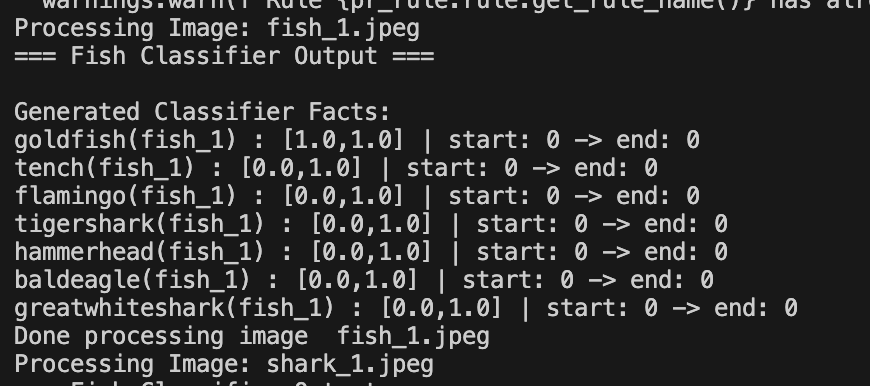
Fish image trace
Processing Image: fish_1.jpeg
=== Fish Classifier Output ===

Generated Classifier Facts:
goldfish(fish_1) : [1.0,1.0] | start: 0 -> end: 0
tench(fish_1) : [0.0,1.0] | start: 0 -> end: 0
flamingo(fish_1) : [0.0,1.0] | start: 0 -> end: 0
tigershark(fish_1) : [0.0,1.0] | start: 0 -> end: 0
hammerhead(fish_1) : [0.0,1.0] | start: 0 -> end: 0
baldeagle(fish_1) : [0.0,1.0] | start: 0 -> end: 0
greatwhiteshark(fish_1) : [0.0,1.0] | start: 0 -> end: 0
Done processing image  fish_1.jpeg
After classification: what PyReason does next
Reasoning runs at timestep 0 and finishes in three fixed-point passes (you
will see Fixed Point iterations: 3 in the log).
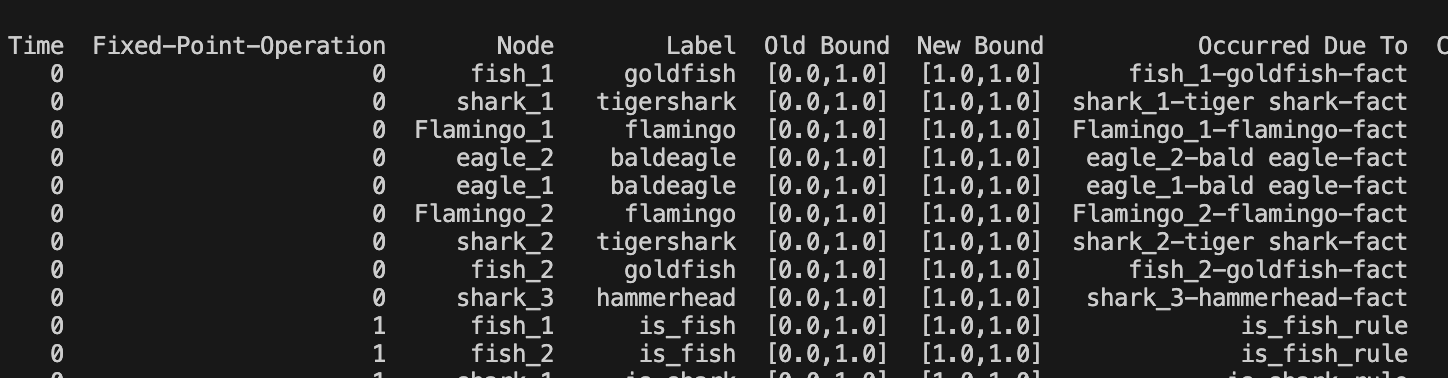
Pass 0. Facts on the graph. The trace rows with Fixed-Point-Operation
0 are the classifier facts: each image node gets its winning species as a
predicate (goldfish, tigershark, flamingo, baldeagle, etc.).
Occurred Due To points at the fact name that fired.
Pass 1. Group the animals. The rules lift those facts into is_fish,
is_shark, is_flamingo, is_eagle, and is_bird. A bald eagle ends
up with both is_eagle and is_bird because two different rules match.
Pass 2. Extra facts and edges. From is_shark you get is_scary. From
is_bird you get can_fly for flamingos and eagles. The likes_to_eat
edges show up here too (sharks and flamingos both use rules named likes_to_eat
toward fish nodes).
Full node and edge traces for this example are saved under
examples/csv_outputs/image_classifier_rule_trace_nodes.csv and
examples/csv_outputs/image_classifier_rule_trace_edges.csv.
Warning
Node and edge traces are printed as pandas tables. A narrow terminal may hide
columns in the middle and show .... Widen the terminal or print with
to_string() if you need every column.
Sample end of run
Common Pitfalls
If you see many
[0.0,1.0]facts and very few[1.0,1.0]facts, your image may not match the selected allowed labels well.If a class never appears, confirm:
the class exists in
model.config.id2labelthe class spelling in
allowed_labelsmatches model labelsyour image set actually contains that visual concept clearly