PyReason Custom Threshold
In this tutorial, we will look at how to run PyReason with Custom Thresholds. Custom Thresholds are parameters in the Rule Class.
Note
Find the full, excecutable code here
The following graph represents a network of People and a Text Message in their group chat.
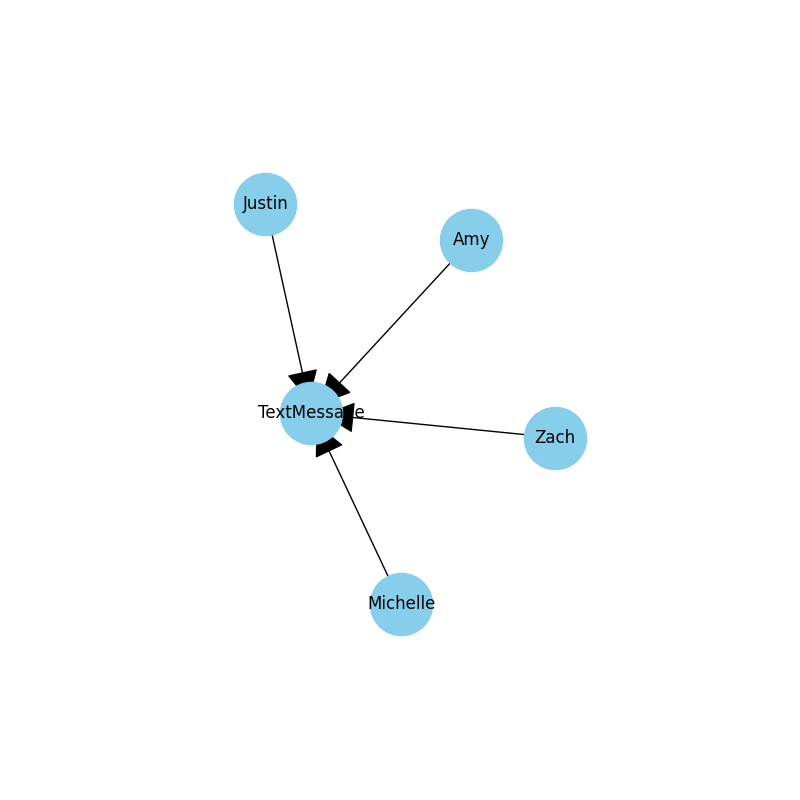
Graph
First, we create the graph using Networkx. This graph has nodes Zach, Justin, Michelle, Amy, and TextMessages.
import networkx as nx

# Create an empty graph
G = nx.Graph()

# Add nodes
nodes = ["TextMessage", "Zach", "Justin", "Michelle", "Amy"]
G.add_nodes_from(nodes)

# Add edges with attribute 'HaveAccess'
edges = [
    ("Zach", "TextMessage", {"HaveAccess": 1}),
    ("Justin", "TextMessage", {"HaveAccess": 1}),
    ("Michelle", "TextMessage", {"HaveAccess": 1}),
    ("Amy", "TextMessage", {"HaveAccess": 1})
]
G.add_edges_from(edges)
Then intialze and load the graph into PyReason with:
import pyreason as pr
pr.load_graph(G)
Rules
Considering that we only want a text message to be considered viewed by all if it has been viewed by everyone that can view it, we define the rule as follows:
ViewedByAll(x) <- HaveAccess(x,y), Viewed(y)
The head of the rule is ViewedByAll(x) and the body is HaveAccess(x,y), Viewed(y). The head and body are separated by an arrow which means the rule will start evaluating from
timestep 0.
Next, add in the custom thresholds. In this graph, the custom_thresholds ensure that in order for the rules to be fired, specific criteria must be met.
import pyreason as pr
from pyreason import Threshold

.. code:: python

# add custom thresholds
user_defined_thresholds = [
    Threshold("greater_equal", ("number", "total"), 1),
    Threshold("greater_equal", ("percent", "total"), 100),
]
- The
user_defined_thresholdsare a list of custom thresholds of the format: (quantifier, quantifier_type, thresh) where: quantifier can be greater_equal, greater, less_equal, less, equal
quantifier_type is a tuple where the first element can be either number or percent and the second element can be either total or available
thresh represents the numerical threshold value to compare against
- The custom thresholds are created corresponding to the two clauses
(HaveAccess(x,y)andViewed(y))as below: (‘greater_equal’, (‘number’, ‘total’), 1) (there needs to be at least one person who has access to
TextMessagefor the first clause to be satisfied)(‘greater_equal’, (‘percent’, ‘total’), 100) (100% of people who have access to
TextMessageneed to view the message for second clause to be satisfied)
Next, add the Rule, with the user_defined_thresholds are passed as parameters to the new Rule. viewed_by_all_rule is the name of the rule. This helps to understand which rule/s are fired during reasoning later on.
pr.add_rule(
    pr.Rule(
        "ViewedByAll(y) <- HaveAccess(x,y), Viewed(x)",
        "viewed_by_all_rule",
        custom_thresholds=user_defined_thresholds,
    )
)
Facts
The facts determine the initial conditions of elements in the graph. They can be specified from the graph attributes but in that case they will be immutable later on. Adding PyReason facts gives us more flexibility.
In our case we want one person to view the TextMessage in a particular interval of timestep.
For example, we create facts stating:
ZachandJustinview theTextMessagefrom at timestep0
Michelleviews theTextMessageat timestep1
Amyviews theTextMessageat timestep2
3is the last timestep the rule is active for all.
pr.add_fact(pr.Fact("Viewed(Zach)", "seen-fact-zach", 0, 3))
pr.add_fact(pr.Fact("Viewed(Justin)", "seen-fact-justin", 0, 3))
pr.add_fact(pr.Fact("Viewed(Michelle)", "seen-fact-michelle", 1, 3))
pr.add_fact(pr.Fact("Viewed(Amy)", "seen-fact-amy", 2, 3))
This allows us to specify components that have an intial condition.
Running PyReason
To run the reasoning in the file:
# Run the program for three timesteps to see the diffusion take place
interpretation = pr.reason(timesteps=3)
This specifies how many timesteps to run for.
Expected output
After running the python file, the expected output is:
Timestep: 0
Timestep: 1
Timestep: 2
Timestep: 3

Converged at time: 3
Fixed Point iterations: 6
TIMESTEP - 0
Empty DataFrame
Columns: [component, ViewedByAll]
Index: []

TIMESTEP - 1
Empty DataFrame
Columns: [component, ViewedByAll]
Index: []

TIMESTEP - 2
    component ViewedByAll
0  TextMessage  [1.0, 1.0]

TIMESTEP - 3
    component ViewedByAll
0  TextMessage  [1.0, 1.0]
For timestep 0, we set
Zach -> Viewed: [1,1]andJustin -> Viewed: [1,1]in the factsFor timestep 1,
Michelleviews the TextMessage as stated in factsMichelle -> Viewed: [1,1].For timestep 2, since
Amyhas just viewed theTextMessage, thereforeAmy -> Viewed: [1,1]. As per the rule, since all the people have viewed theTextMessage, the message is marked asViewedByAll.